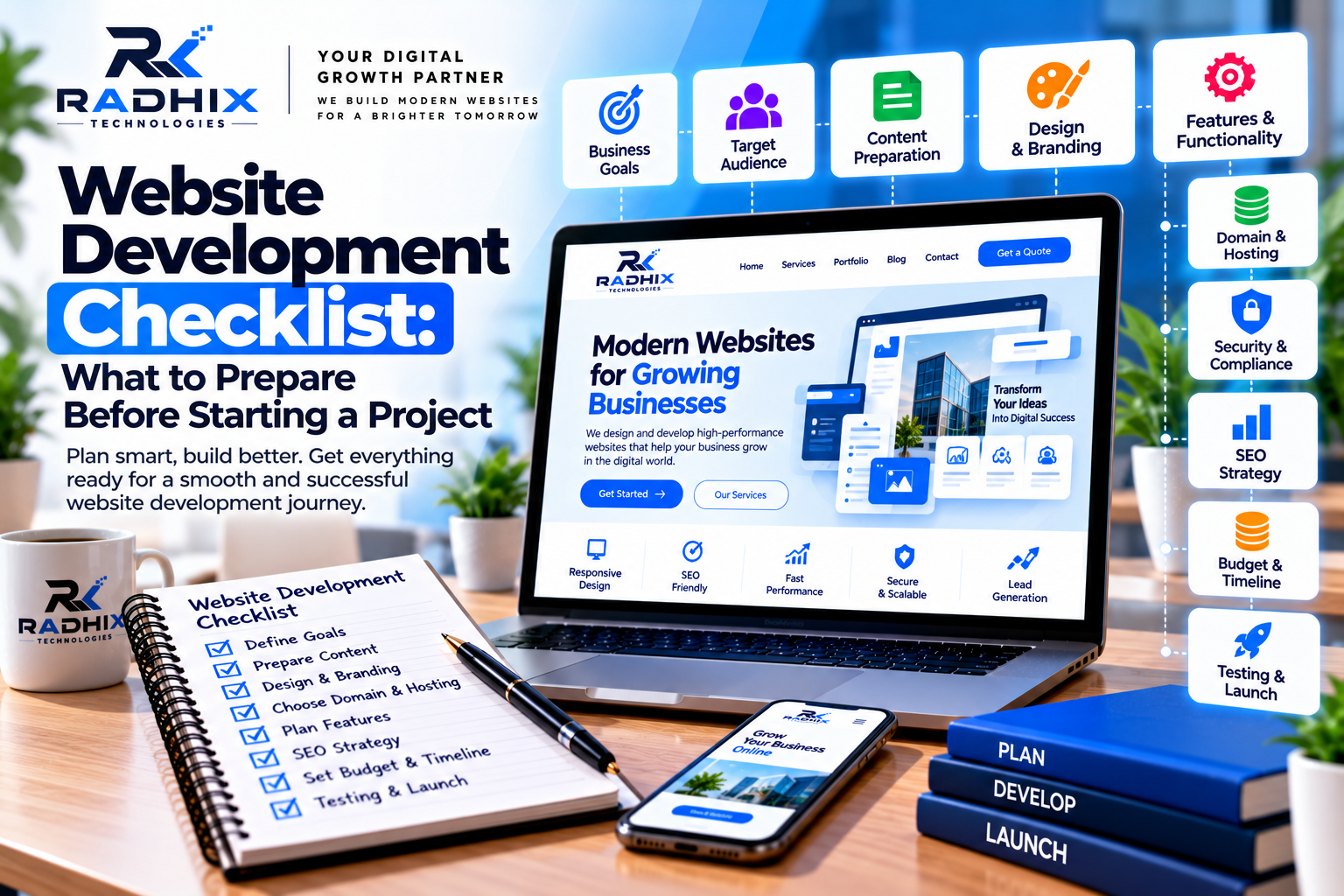
Website Development Checklist: What to Prepare Before Starting a Project
Planning to build a website for your business? Before starting the design and development process, it is important to prepare the right information, content, resources, and business requirements.
Many website projects face delays because businesses have not finalised their page content, branding, features, budget, or approval process. These missing details can lead to repeated revisions, additional costs, and unnecessary confusion between the client and the development team.
A well-planned website project starts with a clear understanding of what the business needs, who the website will serve, and what results it should support.
In this guide, Radhix Technologies shares a practical website development checklist to help you prepare before starting your next website project.
1. Define Your Website Goals
The first step is to decide why your business needs a website. Your goals will influence the design, page structure, features, content, and technology used during development.
Ask yourself:
- Do you want to generate business leads?
- Do you want to showcase your products or services?
- Do you need an online store?
- Do you want customers to book appointments online?
- Do you need a customer portal or dashboard?
- Do you want to improve your online visibility through SEO?
- Do you need to build trust and credibility with potential customers?
For example, a consulting company may need service pages and enquiry forms, while an e-commerce business requires product listings, a shopping cart, payment integration, and order management.
Checklist:
- Define the main purpose of the website.
- Identify your primary target audience.
- Select the most important services or products.
- Decide what visitors should do on the website.
- Establish measurable business goals.
2. Identify Your Target Audience
A successful website should be designed around the needs of its visitors.
Understanding your audience helps determine the website's language, content, design, navigation, and calls to action.
Consider the following questions:
- Who are your ideal customers?
- Which industries or locations do they belong to?
- What problems are they trying to solve?
- What information do they need before contacting you?
- Which devices are they likely to use?
- What makes them choose your business over competitors?
For example, a B2B software company may need detailed service explanations, case studies, and demo-request forms. A local service provider may need service information, location details, customer reviews, and a prominent contact button.
Checklist:
- Define your ideal customer.
- Understand customer needs and challenges.
- Identify the questions customers frequently ask.
- Review competitor websites for useful insights.
- Plan content that addresses customer concerns.
3. Prepare Your Website Pages and Structure
Before design begins, prepare a list of pages your website requires. This helps the development team estimate the project scope and create a logical navigation structure.
A standard business website may include:
Home Page: Introduces your company, services, key benefits, and primary call to action.
About Us: Explains your company background, mission, expertise, and values.
Services: Describes your services and how they help customers.
Portfolio or Projects: Showcases relevant work, case studies, or examples.
Blog: Publishes helpful articles, industry insights, and educational content.
Contact Us: Provides contact details, enquiry forms, and relevant location information.
Privacy Policy and Terms: Explains applicable privacy practices, website terms, and other relevant legal information.
Depending on your business, you may also need pricing pages, FAQs, careers, product pages, booking pages, or customer dashboards.
Checklist:
- Prepare a complete page list.
- Decide the main navigation menu.
- Identify pages requiring custom functionality.
- Plan internal links between related pages.
- Finalise which pages are essential for launch.
- Separate future enhancements from launch requirements.
4. Prepare Your Website Content
Website content is one of the most important parts of development. The design team needs to understand the actual content before finalising layouts and page sections.
Prepare the following information wherever applicable:
- Company introduction
- Business overview
- Service descriptions
- Product details and pricing
- Company achievements
- Team information
- Customer testimonials
- Frequently asked questions
- Contact details
- Calls to action
- Blog articles and supporting resources
Write content in clear language that your target audience can understand. Explain what your business offers, who it helps, and why customers should consider your services.
Avoid relying entirely on placeholder text. Real content makes it easier to plan headings, images, page layouts, and SEO requirements.
Checklist:
- Prepare the content for each planned page.
- Verify spelling, grammar, and factual details.
- Finalise service and product descriptions.
- Prepare calls to action.
- Approve important website text.
- Identify any content that still needs to be written.
5. Arrange Your Logo, Branding, and Images
Your website should have a consistent visual identity that reflects your business.
Before development starts, collect your logo, brand colours, typography preferences, and relevant images. If you have an existing brand guideline, share it with the development team.
Useful assets may include:
- Logo in PNG, SVG, or another suitable format
- Brand colour codes
- Preferred fonts
- Product photographs
- Team photographs
- Project screenshots
- Service-related illustrations
- Office or business photographs
- Videos and promotional graphics
Use clear, relevant images that support the content. Large, unoptimised images can slow down your website, so media should be prepared for appropriate dimensions and file sizes.
If you do not have professional images, discuss suitable alternatives with your designer.
Checklist:
- Share your approved logo.
- Confirm brand colours and fonts.
- Collect relevant photographs and graphics.
- Ensure you have permission to use the assets.
- Prepare images in suitable formats and sizes.
- Add meaningful alternative text to informative images.
6. Finalise Your Website Features and Functionality
Not every website requires the same features. Clearly listing your functional requirements helps the development team choose an appropriate technical solution and estimate the cost accurately.
Common website features include:
- Contact and enquiry forms
- WhatsApp integration
- Click-to-call functionality
- Blog management
- Search functionality
- Customer login and registration
- Appointment booking
- Payment gateway integration
- Product and inventory management
- CRM integration
- Email notifications
- Admin dashboard
- Analytics and conversion tracking
For example, if you want customers to book appointments, specify available time slots, booking confirmations, cancellation rules, and notification requirements.
If you need an e-commerce website, define product categories, payment methods, shipping rules, inventory requirements, and order notifications.
Checklist:
- List all required features.
- Mark essential and optional features.
- Identify third-party integrations.
- Define user roles and permissions, if required.
- Explain how forms and enquiries should be handled.
- Plan future features separately where appropriate.
7. Decide Your Domain Name and Hosting
Your domain name is your website's address, while hosting provides the environment where your website runs.
If you already own a domain, confirm that you have access to its registrar and DNS settings. If you need a new domain, choose a name that is relevant to your business, easy to remember, and suitable for long-term use.
Hosting requirements depend on the website's technology, expected traffic, storage, performance needs, and integrations.
Before selecting hosting, consider:
- Expected website traffic
- Storage and bandwidth
- Server performance
- SSL/HTTPS support
- Backup options
- Security features
- Technical support
- Renewal pricing
- Compatibility with your chosen technology
Make sure your business retains control of essential accounts and understands who is responsible for renewals and technical administration.
Checklist:
- Select or confirm your domain name.
- Verify domain ownership and access.
- Choose suitable hosting.
- Confirm renewal and maintenance costs.
- Plan SSL/HTTPS configuration.
- Identify who will manage DNS and deployment.
8. Plan Your Website SEO Before Development
Search engine optimisation should be considered from the planning stage rather than added only after the website is complete.
A well-planned website structure makes it easier to organise pages, write useful content, and help search engines understand your website.
Prepare an initial SEO plan covering:
Keyword Research: Identify the search terms your potential customers use.
URL Structure: Choose clear, descriptive URLs for important pages.
Meta Titles and Descriptions: Prepare relevant metadata for key pages.
Heading Structure: Organise content using clear page headings and subheadings.
Internal Linking: Connect related services, blog posts, and supporting pages.
Image Optimisation: Use suitable image sizes and descriptive alternative text.
Technical SEO: Plan crawlability, canonical URLs, sitemap configuration, robots directives, and mobile-friendly page layouts.
Local SEO: If your business serves a specific area, prepare accurate business information and relevant location-focused content.
Remember that SEO setup does not guarantee search rankings. Results depend on content quality, technical implementation, competition, and ongoing optimisation.
Checklist:
- Identify target keywords and search intent.
- Plan SEO-friendly page URLs.
- Prepare page titles and meta descriptions.
- Create a logical heading structure.
- Plan internal links.
- Prepare an XML sitemap strategy.
- Configure relevant analytics and search tools.
- Review mobile usability and performance requirements.
9. Set Your Website Development Budget
Before starting development, define your budget and understand what is included in the proposed quotation.
Website development costs depend on page count, custom design, functionality, integrations, content requirements, technology, and delivery timelines.
Your budget may need to cover:
- UI/UX design
- Frontend and backend development
- Content writing
- Image and graphic design
- Domain and hosting
- Paid themes, plugins, or software licences
- Third-party integrations
- SEO setup
- Testing and deployment
- Maintenance and support
Request a written quotation that clearly defines deliverables, exclusions, payment milestones, revision limits, and post-launch responsibilities.
Avoid comparing proposals only by price. A low-cost solution may not include the features, documentation, support, or ownership arrangements your business needs.
Checklist:
- Set an approximate project budget.
- Request a detailed quotation.
- Confirm what is included and excluded.
- Understand third-party and renewal charges.
- Agree on payment milestones.
- Define maintenance and support terms.
10. Create a Realistic Project Timeline
A clear project timeline helps both the client and development team coordinate their work.
A typical website project may involve discovery, planning, design, development, content entry, testing, and launch. The duration varies depending on project complexity and how quickly content and approvals are provided.
Discuss the following milestones before work begins:
- Requirement gathering and project planning
- Sitemap and wireframe approval
- UI/UX design approval
- Frontend and backend development
- Content integration
- Feature and integration testing
- Client review and revisions
- Final approval and deployment
Assign a responsible person for providing content, reviewing designs, testing features, and approving the final website.
Delays in feedback, missing information, or late changes to the agreed scope can affect delivery dates.
Checklist:
- Agree on the project start date.
- Define major project milestones.
- Assign approval responsibilities.
- Set review and feedback deadlines.
- Agree on the number of revisions.
- Document the launch target and dependencies.
11. Prepare Security, Privacy, and Legal Requirements
Security and privacy requirements should be discussed before the website collects customer information or processes transactions.
Depending on your website, you may need a privacy policy, terms and conditions, cookie information, consent mechanisms, and other relevant legal notices. Requirements depend on the nature of the business and applicable laws.
Technical preparations may include:
- HTTPS configuration
- Secure administrator accounts
- Appropriate user permissions
- Input validation and spam protection
- Regular backups
- Software and dependency updates
- Secure API and database configuration
- Protection of customer information
- An incident recovery process
For websites handling payments or sensitive information, review the responsibilities of your payment provider and the security requirements applicable to your business.
Checklist:
- Identify what customer information will be collected.
- Prepare applicable legal pages.
- Define administrator access and permissions.
- Plan backups and recovery procedures.
- Confirm HTTPS and security configuration.
- Identify ongoing security responsibilities.
12. Plan Website Analytics and Lead Tracking
A website should help you understand how visitors interact with your business online.
Before development, decide what you want to measure. These measurements should connect to your business objectives rather than focusing only on the number of visitors.
Possible metrics include:
- Website traffic
- Important service-page visits
- Enquiry form submissions
- Phone and WhatsApp clicks
- Appointment bookings
- Product purchases
- Newsletter registrations
- Marketing campaign conversions
Tools such as Google Analytics and Google Search Console can help you understand website traffic, engagement, and search visibility when configured appropriately.
For lead generation websites, also decide who will receive enquiries, how quickly they should respond, and whether leads should be recorded in a CRM.
Checklist:
- Define your key performance indicators.
- Select suitable analytics tools.
- Plan conversion events.
- Confirm form and email tracking.
- Decide how enquiries will be assigned.
- Establish a process for reviewing performance after launch.
13. Test Your Website Before Launch
Before publishing your website, test its pages and functionality in the final production environment.
A website that looks good in a design preview may still contain broken links, incorrect content, form errors, or mobile layout issues.
Review the following areas:
Design and Usability: Check layouts, typography, navigation, and visual consistency.
Mobile Responsiveness: Test pages on smartphones, tablets, and desktop screens.
Forms and Integrations: Confirm submissions, email notifications, booking flows, and external integrations work correctly.
Content: Verify spelling, contact details, images, links, and page information.
Performance: Check page loading behaviour and optimise large assets or unnecessary scripts.
SEO: Review metadata, canonical URLs, indexing settings, redirects, and sitemap configuration.
Accessibility: Test keyboard navigation, visible focus, readable content, and meaningful image alternatives.
Security: Confirm HTTPS, appropriate permissions, backups, and production configuration.
Checklist:
- Test all important pages.
- Check mobile and desktop layouts.
- Test forms and notifications.
- Verify buttons and links.
- Remove placeholder content.
- Check page metadata and indexing settings.
- Review performance and accessibility.
- Confirm backups and recovery arrangements.
- Test the live domain before announcing launch.
14. Confirm Website Ownership and Maintenance
Website launch is not the end of the project. Regular maintenance helps keep the website secure, functional, and aligned with changing business requirements.
Before signing off, confirm who owns and controls the website's essential assets.
These may include:
- Domain registrar account
- Hosting account
- Website source code
- Content management system
- Database and backups
- Analytics accounts
- Business email accounts
- Third-party service accounts
- Design files and documentation
Your agreement should explain what source code, design files, documentation, and administrative access will be delivered.
It should also define post-launch support, maintenance charges, backup frequency, update responsibilities, and how future changes will be handled.
Checklist:
- Confirm ownership and access rights in writing.
- Receive agreed source code and design files.
- Obtain required administrator credentials securely.
- Document the hosting and deployment process.
- Define maintenance and support responsibilities.
- Confirm backup and recovery arrangements.
- Plan future updates and improvements.
Quick Website Development Preparation Checklist
Use this checklist before contacting a website development company.
- Business goals and target audience defined
- Website type and project scope confirmed
- Page list and navigation planned
- Website content prepared
- Logo, colours, and brand assets collected
- Required features documented
- Domain and hosting requirements reviewed
- SEO requirements identified
- Budget and payment milestones agreed
- Project timeline and approval process defined
- Security and privacy requirements reviewed
- Analytics and lead tracking planned
- Testing and launch process agreed
- Ownership and maintenance responsibilities documented
How Radhix Technologies Can Help
At Radhix Technologies, we understand that successful website development starts with proper planning.
Our team helps businesses turn their ideas into practical digital solutions through website development, e-commerce development, custom software, web applications, and digital marketing services.
Whether you need a simple business website, a lead generation landing page, or a feature-rich web application, defining the requirements early helps establish a clearer project scope.
We can help you plan your website structure, select suitable technologies, identify essential features, and prepare for development and launch.
Planning a new website for your business? Contact Radhix Technologies to discuss your requirements and create a clear roadmap for your project.
Conclusion
Preparing for website development involves much more than selecting a design or choosing a developer. You need to define your goals, understand your audience, organise content, plan features, prepare branding, evaluate technology, and establish a realistic budget and timeline.
SEO, security, analytics, testing, ownership, and maintenance should also be considered before the website goes live.
A clear checklist helps reduce misunderstandings, minimise avoidable revisions, and create a smoother working relationship between your business and the development team.
The best website projects begin with clear requirements and end with a solution that supports real business goals. Take the time to prepare properly, and you will be in a stronger position to build a professional website that can grow with your business.
Frequently Asked Questions
1. What should I prepare before starting website development?
Prepare your business goals, target audience, page list, content, logo, images, required features, domain and hosting information, budget, timeline, and SEO requirements.
2. Do I need to buy a domain before contacting a developer?
No. You can discuss your project before purchasing a domain. However, you should decide who will register and own it, and make sure your business retains appropriate access and control.
3. How much does website development cost?
The cost depends on the number of pages, design complexity, functionality, integrations, technology, content, and support requirements. Request a detailed quotation based on your specific scope.
4. Should SEO be planned before website development?
Yes. Planning SEO early helps establish the page structure, URL format, content requirements, metadata, internal linking, and technical setup.
5. What information should I provide to a website developer?
Provide a project brief explaining your business, audience, goals, required pages, functionality, branding, reference websites, budget, and expected timeline.
6. How long does it take to develop a business website?
The timeline depends on the project's scope, design complexity, integrations, content readiness, testing requirements, and approval process. A clear project plan helps set realistic expectations.
7. Can I add new features after my website launches?
Yes. Features can often be added later, depending on the technology and architecture. Discuss likely future requirements before development so the solution can be planned appropriately.
8. What should I receive after the website is completed?
Depending on your agreement, deliverables may include the live website, source code, design files, documentation, administrator access, and deployment details. Ownership, support, and maintenance terms should be agreed upon in writing.